Rockman Zero 3 · Korean Patch · Stable v1.0.0
Return to Zero’s familiar adventure,
in Korean.
From dialogue and descriptions to the title screen and fixed menu labels.
Play Rockman Zero 3 in Korean as the original Zero.
01 · About the Patch
Zero’s adventure,
in Korean
A standalone Korean localization
featuring the original playable Zero.
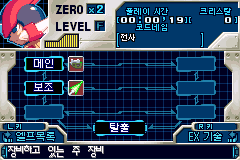
This patch brings Korean dialogue and menus to Rockman Zero 3 while retaining the original playable Zero. It builds on the dialogue and descriptions in the existing Korean translation, adding a Korean title screen and start prompt, fixed labels in the equipment, EX, options, and Cyber-elf menus, and Korean code names.
The title screen’s clipped lower strokes and border have been restored, and the Inti Creates startup logo has been redrawn in Korean pixel lettering. The original ZERO label, Zero’s portrait and body diagram, and the weapon and EX icons are preserved.
The original character, attacks, movement, progression, and rewards are preserved. New games follow the original starting conditions; equipment, chips, EX skills, and items are earned through play.
This is not an entirely new translation of every screen. Dynamic text retains the existing Korean translation. Both the Japanese original and the specified existing Korean ROM can be patched to the same stable v1.0.0 release.
02 · Translation Scope
From the title screen to the menus,
clear Korean text.
Start Zero 3 in Korean
Includes a Korean title screen, start prompt, and Inti Creates startup logo. The bottom strokes and border of the title screen are displayed in full.
Fixed menu labels and code names
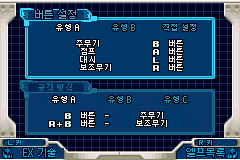
Menu labels, control prompts, and code names are localized into Korean. Zero’s portrait and the original icons are preserved.
Play as the original Zero
Follow the original combat, movement, rewards, and unlock conditions. Begin with the original opening sequence, without granting all items or skipping the intro.

03 · Download & Installation
Prepare your original ROM,
then play in Korean.
Keep the original; save a new file
- Extract all files from the release ZIP into a new folder.
- Open
한글화_패치도구.htmlin Edge or Chrome. - Select the Japanese original or the specified existing Korean
.gbaROM. - Choose 「패치 적용」 (Apply patch) and save the result as a new file.
- Run the new file in your emulator.
Everything runs offline inside your browser, with no installation or separate server. The input ROM and save files are not overwritten.
Output filename: Rockman Zero 3 - Korean Localization v1.0.0.gba
04 · User Guide
Expand the sections you need.
Supported Inputs · File Sizes & Hashes
A matching filename alone does not establish compatibility. Use an original ROM with the exact size and SHA-1 listed below.
| Input ROM | Size | SHA-1 |
|---|---|---|
| Japanese original · BZ3J | 8,388,608 bytes | ff7a801776dc76e6d8c7ef73a6660ae732934a3f |
| Specified existing Korean ROM | 9,437,184 bytes | e30a4c928afe3bd3c1c2b1dbb60bd602ddb9a708 |
North American, development, and other modified ROMs are unsupported. The patcher blocks installation when the file does not match.
Basic Controls · Original Progression
| Setting | Notes |
|---|---|
| Move · Jump | D-pad · A |
| Dash | L |
| Main weapon · Sub-weapon | Default Type A: B · R + B |
| Charged attack | Hold the attack button, then release |
| Menu · Equipment | Start: menu · D-pad and A: select · L/R: change page |
Check your emulator’s key bindings. Additional equipment, chips, EX skills, and items are earned under the original game’s conditions.
Restore the Japanese or Existing Korean Original
In the patcher’s operation selector, choose 「일본판으로 복원」 (Restore Japanese original) or 「기존 한국어판으로 복원」 (Restore existing Korean original). Select this release’s patched ROM and choose 「원본 복원」 (Restore original) to save a new file that matches the selected original byte for byte. Save files are unchanged.
Existing Saves · Other Mods
Close the emulator and back up your battery save (.sav) first. Prepare a copy with the same base filename as the new ROM. Use in-game saves instead of older save states. Compatibility with every save-data combination is unverified.
This is a standalone Korean patch. For Omega Zero, Harpuia, or Leviathan, use that mod’s own release tool; do not apply this patch on top of a character mod.
Verification Scope · ZIP Integrity
Before publication, all 14 release checks passed. Checks cover byte-for-byte installation from both supported inputs and restoration to either original, rejection of invalid, duplicate, or corrupted input, ZIP CRC, UTF-8 filenames, checksums, and reproducible ZIP output.
Existing mGBA records for the same game data as the final output cover 133,000 menu/gameplay frames, 2,000 startup-logo frames, and 7,200 title-screen frames: 142,200 frames in total. Without forced RAM writes, these checks covered menu selection, cancellation and return to gameplay, original player state, movement, attacks and health, and the startup logo and title screen.
The game was not rerun during this publication work. The full campaign, real hardware, and every save-data combination remain unverified. See 검증결과.json in the ZIP for details.
ZIP SHA-256: 82c2cca8e226e1c5e932c0a94e4d02336c55a02b1e4b3340bc6b944c5e069eb8
Troubleshooting · Credits
If the output file is missing, check your downloads folder and browser blocking notifications. If the display looks wrong, restart the emulator without loading a save state. When reporting an issue, include the patch version, emulator name and version, input ROM type, stage, and reproduction steps.
Original game: CAPCOM / INTI CREATES. Uses existing Korean translation and menu assets, plus Galmuri for additional menu lettering. The font license is included as 글꼴_OFL.md in the ZIP. Unconfirmed authorship or licensing of the earlier translation is not asserted.
Rockman Zero 3 · Korean Patch
With Zero,
return to a familiar adventure.
Enjoy Zero 3 in Korean while following the original combat and progression.